Everything You Need to Know about Sunsetting Software
Every piece of software is eventually sunset and taken offline. This post will help your business know when, how, and why it makes sense to sunset part of your software stack.
Essentially it just means intentionally phasing out or retiring something—a brand, partnership, agreement, policy, hardware, or software. Products and services are sunset when they are no longer profitable or when a company decides to change its focus. From a software perspective, older versions are usually sunset when newer versions become available. It’s the next step after a program is no longer maintained or supported by the developer.
Sunsetting software can be necessary for a few reasons. For one, it allows developers to maintain focus on new and current technology, instead of spending valuable time and resources on supporting outdated versions. It’s also cost effective, as retired software no longer requires updates and ongoing maintenance.
There can be other reasons to sunset a product as well, such as environmental influences like the introduction of new standards or regulatory requirements. Legal constraints can also force a product to be retired, such as if a company has formed a monopoly and is forced to reduce specific activities.
Conversely, sometimes sunsetting is part of the original plan. A “sunset provision” in a legal context, for example, is a specification that a clause will no longer be in effect beyond a certain date or after a particular event.
So, when does it make sense to build software knowing it will one day be sunset?
The first thing to recognize is that all software will eventually be retired.
Let’s be real. As fast as things change in our world today, nothing is going to stay relevant forever. That means even the most successful software products need a retirement plan. That makes it easier to get your head around the idea of developing software knowing it will one day come to an end. Then it’s a short leap to the idea that, in some cases, that end date is known up front, from the very beginning.
So, when does it make sense to build software knowing it will have a limited shelf life?
Short answer: When the return on investment is still positive.
To elaborate, let’s look at two examples from Worthwhile’s portfolio…
ERP Integration
CUI is a heating supply wholesaler whose business relies on stocking and quickly shipping orders to dealers in the eastern United States. The problem they faced was that their 30-year-old enterprise resource planning software (ERP) couldn’t display inventory information or status to customers online.
Worthwhile built software specifically designed to extend the life of CUI’s ERP just for 2-3 years, until they were ready for a massive transformation. It made financial sense for this company to spend some money to clean things up in the meantime to better serve their customers, increase conversions, and buy some time while they worked on a longer-term solution.
Custom App
Athene Annuity is a provider of retirement savings products. They needed help automating their annuity application suitability review process. Worthwhile created an app that dramatically improved the user experience. Even though the app was sunset after just 18 months due to corporate reorganization, the ROI on its development was still positive due to the massive gains in efficiency it achieved shortly after being implemented.
As you can see, even though the software in these examples were used for relatively short periods of time—even as short as 18 months—their development still made sense from an effort and ROI perspective. This just demonstrates that a program doesn’t have to be considered long term for its development to be worthwhile. In some cases, sunsetting a software program just a few years after its release is the best move.
So what’s the process for sunsetting?
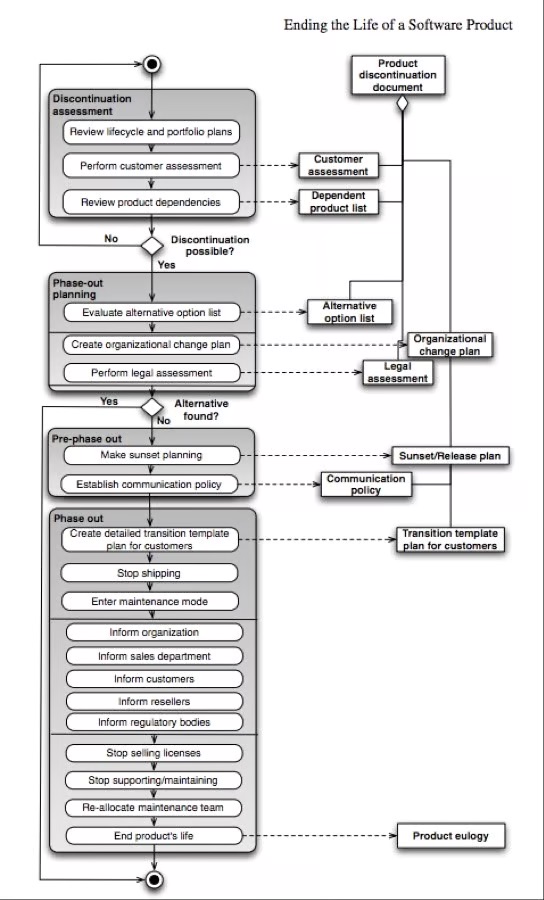
There are several methods for discontinuing a piece of software. The following graphic depicts just one. On the left side of the diagram are the method activities, and on the right side are the deliverables as the method is executed:
Not following? No worries.
Here are a few notes on the stages outlined above, especially when it comes to a software as a service product. It’s important for your business to understand how your software vendors are thinking when it comes time to sunset a product, so read on:
Discontinuation Assessment
The viability of any software should be regularly assessed through a process that looks at its success, profitability, and growth. It’s also worth considering the impact on all the products that depend on that software. If a product is indeed being considered for retirement, a customer assessment should also be done to determine:
How important the product is for its customers
How important those customers are to the company
How discontinuing the software will impact the long-term customer relationship
Phase-out Planning
This involves evaluating possible alternatives to phasing out a software product. Some options could include:
Establishing an open source community to further support and maintain the product
Having a group of key people in the product group buy the product out of the portfolio and continue as an independent organization
Selling the software to a third party
Based on these alternatives, an organizational change plan can be created to establish how the product discontinuation is implemented. Likewise, a legal assessment can be performed to establish the consequences of the different variations of the plan.
Pre-phase out
If no alternative is feasible, the product will be phased out. The pre-phase out stage includes detailing the steps of this process, including:
Ending the product’s maintenance and support
Ending the sale of licenses
Establishing a communication plan that minimizes damage to the organization
Phase-out
This involves executing the plan determined in the pre-phase out stage. It also includes creating a customer support plan, such as how to transition customers to a replacement product. At this point, the product will go into maintenance mode and no new functionality will be added. Then, when the product legally no longer requires support and maintenance, these processes can also be stopped.
Finally, it’s worth noting that retiring anything that people have invested significant time, thought and energy into can be an emotional process. Have you heard someone say that a particular project is their “baby”? It’s the same about software programs, so it’s understandable that there may be some pushback when the time comes to sunset it.
How do you tell your clients you are phasing out their software?
Tell your clients as early as you can, in plain language, with the dates that affect them and a clear path to what's next. A sunset handled well keeps clients through the transition. One handled badly, or sprung late, is how you lose them. The announcement is not an afterthought at the end of the process. It's the part your clients will remember.
Give real lead time, and announce in stages
The worst version of this news is the version that arrives late. Give clients enough runway to plan a migration, not just absorb a shock, and stage the communication so nothing lands as a surprise. A first notice that the product is being retired, then reminders as end of support and end of life approach, gives people time to act instead of scramble. The more critical your software is to their operations, the more lead time you owe them.
Say what the notice actually needs to say
A clear sunset notice answers the questions a client will ask before they ask them. Name the three dates that govern their planning: when you stop selling it, when support ends, and when the software is fully retired. Say whether a replacement is coming and what happens to their data. Tell them exactly who to contact with questions. Vagueness on any of these reads as evasion, and it's what turns a manageable transition into a support fire.
Own the decision plainly
Lead with the news, not a paragraph of reassurance the reader has to dig through to find the date. Clients can tell when a retirement is being softened into something that sounds optional, and the ambiguity costs you more than the honesty would. State the decision, give the reason briefly, and respect that they're adults running a business. Straight talk is what earns you the benefit of the doubt on the transition.
Tell your most dependent clients first
Your highest-value and most deeply integrated clients should hear this directly, before the broad announcement, from a person rather than a mass email. They have the most to untangle and the most reason to leave if they feel blindsided. A short, direct conversation ahead of the general notice signals that you understand what the change costs them, and it's often the difference between a client who migrates with you and one who shops the competition.
Give them a path, not just a deadline
A notice tells clients something is ending. A good notice tells them what to do about it. Point them to the replacement if there is one, provide export tools and a real transition window, and document how to move their data cleanly. If you can, give them a guide written for their side of the change. It's the clearest way to show the relationship matters to you past the shutdown date.
The clients who feel guided through a sunset are the ones who stay for whatever you build next. The ones left to figure it out alone are the ones you've quietly taught to look elsewhere.
In Conclusion
Whether a software vendor is sunsetting a piece of software in your tech stack, or your company decides to move on from a custom business application, it’s important for you not to look this process as failure. Instead, it’s a natural part of the lifecycle of your business.
That’s why sunset is the right term for this process. You need one day—or one software era—to end so that a new day can begin. So when you think of sunsetting software, picture the opportunities of a new day. And then get started.
Software Sunsetting FAQs
What does it mean to sunset software?
To sunset software means to retire it on a planned, announced timeline. The developer stops adding features, then ends sales and support, and eventually shuts it down. Sunsetting is deliberate and scheduled, which is what separates it from an abrupt shutdown, and it usually unfolds in stages so the people who depend on the software can prepare.
Why do companies sunset software?
Companies sunset software to stop spending on products that no longer earn their keep. Maintaining an aging system gets more expensive every year, pulls engineering time away from current work, and carries rising security risk. Retirement can also follow a merger, a strategy shift, or new regulation. In each case, sunsetting frees resources for what the business is building next.
How do you tell clients you're sunsetting a product?
Announce it early, in plain language, and in stages. Lead with the decision and the dates that affect them: end of sale, end of support, and end of life. Say whether a replacement is coming and what happens to their data, and give them a clear contact. Reach your most dependent clients directly before the broad announcement.
How much notice should you give before sunsetting software?
More than feels comfortable, and more when the software is critical to how clients operate. Enough runway to plan and execute a migration, not just absorb the news, which for a deeply integrated system can mean a year or more. Announcing in stages, with reminders as key dates approach, matters as much as the total lead time.
How do you keep clients through a software sunset?
Give them a path, not just a deadline. Clients leave when a retirement feels like being abandoned, and they stay when it feels guided. Offer a replacement or migration route, real export tools, a workable transition window, and clear instructions for moving their data. Handled with that care, a sunset becomes a reason to trust you with what comes next.